opkg update
opkg install relayd

/etc/init.d/relayd enable
Next, we edit the configuration files.
dhcp
...
config dhcp lan
	option interface	lan
	option start 	100
	option limit	150
	option leasetime	12h
	option ignore 1

config dhcp wan
	option interface	wan
	option ignore	1
firewall
config defaults
	option syn_flood	1
	option input		ACCEPT
	option output	ACCEPT
	option forward	REJECT
# Uncomment this line to disable ipv6 rules
#	option disable_ipv6	1

config zone
 option name lan option network 'lan wwan' option input ACCEPT option output ACCEPT option forward ACCEPT

config zone
	option name	wan
	option network 'wan'
	option input	REJECT
	option output	ACCEPT
	option forward REJECT
	option masq 1
	option mtu_fix 1

config forwarding
	option src		lan
	option dest		wan
...
wireless
config wifi-device 'radio0'
	option type 'mac80211'
	option macaddr '00:00:00:00:00:00' # Ваш mac адрес
	option hwmode '11ng'
	option htmode 'HT20'
	list ht_capab 'SHORT-GI-20'
	list ht_capab 'SHORT-GI-40'
	list ht_capab 'RX-STBC1'
	list ht_capab 'DSSS_CCK-40'
	option country 'RU'
	option disabled '0'
	option txpower '20'
	option channel 'auto'

# Client for Netgear WNR3500L
config wifi-iface
	option device 'radio0'
	option network 'wwan'
	option mode 'sta'
	option ssid 'Netgear'
	option encryption 'psk2'
	option bssid '11:11:11:11:11:11' # MAC адрес точки доступа
	option key 'keynetgear'

# Access Point MR3020
config wifi-iface
	option device 'radio0'
	option network 'lan'
	option mode 'ap'
	option ssid 'OpenWrt'
	option encryption 'psk2'
	option key 'keymr3020'
Here, everything is simple: the access point mode is added to the client mode
with its own encryption, SSID, etc. If this mode is not needed, delete the Access Point block (or comment it out).
network
config interface 'loopback'
	option ifname 'lo'
	option proto 'static'
	option ipaddr '127.0.0.1'
	option netmask '255.0.0.0'

config interface 'lan'
	option ifname 'eth0'
	option type 'bridge'
	option proto 'static'
	option ipaddr '192.168.2.1'
	option netmask '255.255.255.0'
	option gateway '192.168.1.1'
	option dns '192.168.1.1'

config interface 'wwan'
	option proto 'static'
	option ipaddr '192.168.1.55'
	option netmask '255.255.255.0'
	option gateway '192.168.1.1'
	option dns '192.168.1.1'

config interface 'stabridge'
	option proto 'relay'
	option network 'lan wwan'
	option ipaddr '192.168.1.55'
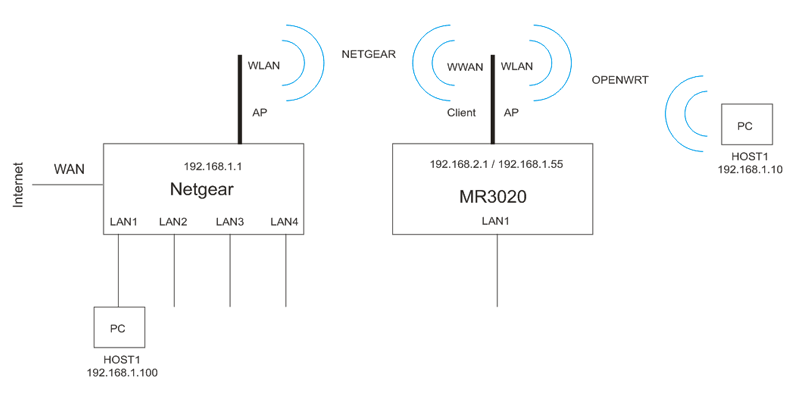
Here, the router has two IP addresses:
an internal one for LAN from another subnet: 192.168.2.1
and an external one for WWAN: 192.168.1.55
The relayd daemon is responsible for switching between the internal and external networks.
It makes this process transparent, so we do not notice the 192.168.2.x subnet.
root@OpenWrt:~# ps
....
4258 root       888 S    /usr/sbin/relayd -I br-lan -I wlan0-1 -L 192.168.1.55 -B -D
....
What we get in the end:
A host connected to LAN or WLAN (via Wi-Fi AP) receives an IP address from the main router in the 192.168.1.x subnet. The mr3020 DHCP server is disabled.
The 192.168.2.x subnet is completely transparent – we do not notice it.
And, of course, from this host, we can freely browse the 192.168.1.x network, including accessing 192.168.1.55 and the Internet.